
Proofreading with the Claude API
January 2, 2026 at 3:57 PM by Dr. Drang
As an alternative to the Writing Tools proofreading macro I showed in yesterday’s post, I built another one, called Proofread With Claude, which gets the edited text through a call to Anthropic’s Claude API. I make the call in Python using Simon Willison’s llm module and the llm-anthropic extension.
Although I knew about the llm module a while ago, I hadn’t considered using it for proofreading until Giovanni Lanzani explained how he does it. His macro uses the llm command-line tool, and he has the LLM highlight the changes by making them bold, but it’s the inspiration for my macro below. I didn’t realize how easy Simon Willison had made using the various LLM APIs until I saw how Giovanni used it.
Here’s the macro:
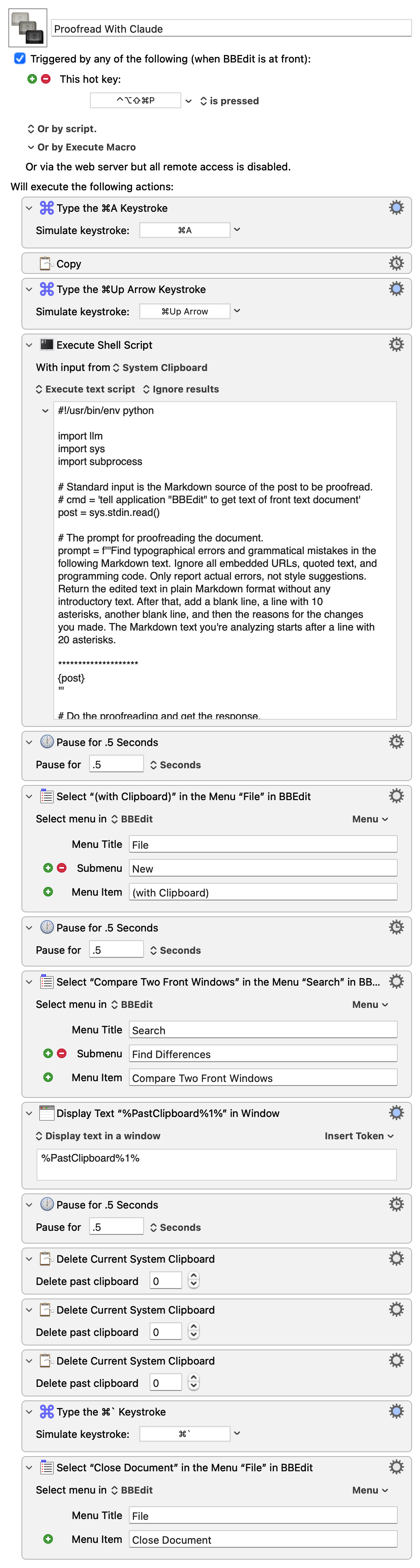
It copies the text of the frontmost BBEdit document and passes it as standard input to this Python script:
python:
 1:  #!/usr/bin/env python
 2:
 3:  import llm
 4:  import sys
 5:  import subprocess
 6:
 7:  # Standard input is the Markdown source of the post to be proofread.
 8:  # cmd = 'tell application "BBEdit" to get text of front text document'
 9:  post = sys.stdin.read()
10:
11:  # The prompt for proofreading the document.
12:  prompt = f'''Find typographical errors and grammatical mistakes in the
13:  following Markdown text. Ignore all embedded URLs, quoted text, and
14:  programming code. Only report actual errors, not style suggestions.
15:  Return the edited text in plain Markdown format without any
16:  introductory text. After that, add a blank line, a line with 10
17:  asterisks, another blank line, and then the reasons for the changes
18:  you made. The Markdown text you're analyzing starts after a line with
19:  20 asterisks.
20:
21:  ********************
22:  {post}
23:  '''
24:
25:  # Do the proofreading and get the response.
26:  model = llm.get_model('claude-sonnet-4.5')
27:  response = model.prompt(prompt)
28:
29:  # Split the response into the edited post and the explanation.
30:  # Put them on the clipboard.
31:  edit, explanation = response.text().split('\n**********\n')
32:  subprocess.run('pbcopy', text=True, input=explanation)
33:  subprocess.run('pbcopy', text=True, input=edit)
The script creates a prompt consisting of the instructions given in Lines 12–21 and the text from BBEdit. It then passes that off to the Claude Sonnet 4.5 model (Lines 26–27).
The response comes back as the edited text with all the changes Claude thinks I should make, a line of ten asterisks, and more text explaining the reasons for the changes. Lines 31–33 split the response at the line of asterisks and copy each part to the clipboard—first the explanation, then the edited text.
Let me step in here and point out that Keyboard Maestro keeps a clipboard history, whether you use it interactively or not. After the script above runs, there are three new items in the history:
- The edited text.
- The explanation.
- The original text.
The edited text is the most recent and is the one used by BBEdit when the File>New>(with Clipboard) menu item is selected.
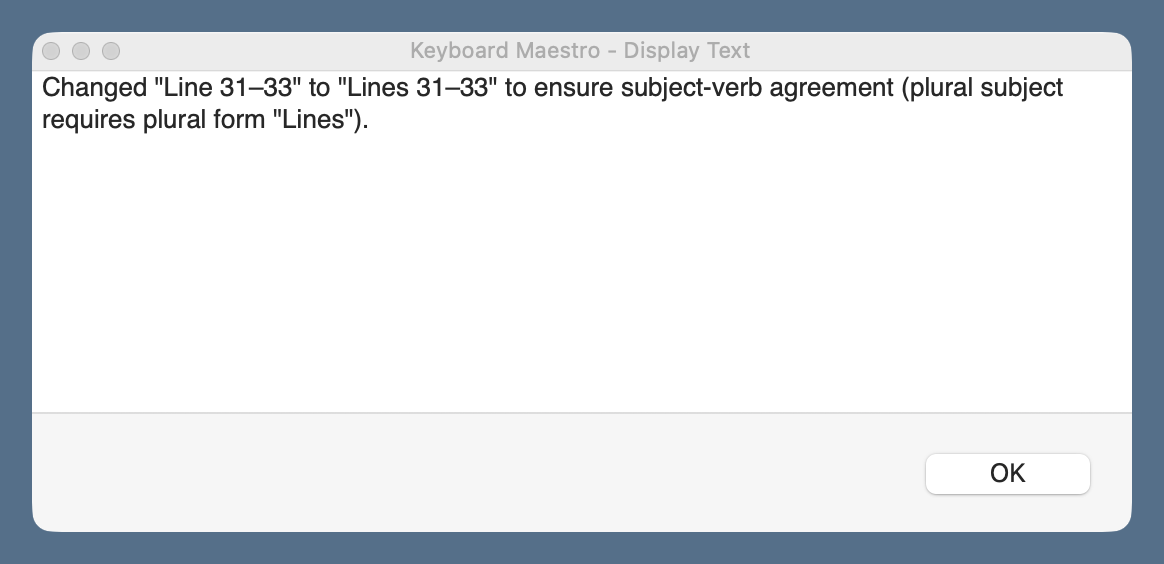
The rest of the macro follows much of the same logic as yesterday’s: it creates a new BBEdit text document with the edited text and compares it with the original text in a two-pane window. In addition, this macro displays the explanation in a floating window, which I refer to as I work my way through the proposed changes.
You’ll notice that I use the same keyboard shortcut, ⇧⌃⌥⌘P, for both the Writing Tools and Claude proofreading macros. When I press those keys, a conflict palette appears, and I choose the proofreader I want.
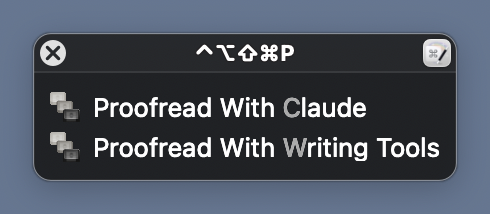
This is easier than remembering a different shortcut for each macro.
Claude’s API access isn’t free, nor is OpenAI’s, which I could switch to through a simple change of the model in Line 26 of the Python script.1 But they’re pay-as-you-go systems, charging for the input and output tokens you use, and neither costs more than a few cents per proofreading session. I don’t see this breaking the bank. I should mention, though, that API access is on top of any monthly subscription you might have. I don’t have a monthly subscription and don’t use LLMs for anything else. For me, pay-as-you-go will be cheaper than a monthly subscription.
There’s no particular reason I chose to make this macro with Claude’s API rather than OpenAI’s. I’ll probably make another one that uses OpenAI soon, just to see how the three variants compare. I don’t think I’ll add Gemini to the mix; if the rumors are correct, I’ll be getting that for free through Writing Tools soon enough.