
Resting heart rate and the Apple Watch
January 15, 2026 at 8:31 PM by Dr. Drang
My apologies to those of you hoping for another pulse-pounding post on the mechanics of belaying, but I’m going to talk about Apple again. The belaying follow-up should come out this weekend.
What prompted this post was being chastised by my phone this morning for getting only about an hour of sleep last night. This was unwarranted. What actually happened was that I fell asleep for maybe an hour and a half while reading last night. When I woke up, I took off my watch, put it on the charger, and got ready for bed. I slept pretty well.
I could take this opportunity to say that since my watch knew damned well that it was on the charger instead of my wrist overnight, it should have shared that information with my phone and told it not to scold me. But my expectations of Apple software have been lowered to the point where that wasn’t even a blip on my radar. It did remind me, though, that I’ve been meaning to write about errors the Apple Watch makes in measuring resting heart rate.
Note the word resting. I think the watch’s heart rate monitor itself does a good job. Whenever I’ve checked its reading against a manual pulse count, the two are very close—close enough that the difference could be a real minute-to-minute variation. But the resting heart rate is supposed to be… well, here’s what Apple says in the Health app:
Your resting heart rate is the average heart beats per minute measured when you’ve been inactive or relaxed for several minutes. A lower resting heart rate typically indicates better heart health and cardiovascular fitness. An increase in resting heart rate at times may be normal and expected, such as during an illness or a pregnancy.
You may be able to lower your resting heart rate over time by staying active, managing your weight, and reducing everyday stress. Resting heart rate does not include your heart rate while you’re asleep and is validated for users over the age of 18.
Emphasis mine.
So the resting heart rate is based not only on the watch’s heart rate monitor, which, as I just said, is quite good, but also on its assessment of whether you’re sleeping or not. Like Santa Claus, the Apple Watch sees you when you’re sleeping and knows when you’re awake. Or does it?
I’ve had an Apple Watch since the Series 3, and over most of that time I’ve taken the watch off when I go to bed and let it charge overnight. In July of 2024, though, I started a diet program to control my Type 2 diabetes. The diet program included an app that wanted the sleep data from my watch, so I started wearing it overnight.
I left the program about a year ago because my insurance changed and my new plan wouldn’t pay for it. Don’t worry, I’m still eating right and my A1C has continued to go down. And I kept wearing my watch overnight because I was in the habit of doing so.
Then came iOS and watchOS 26 this fall and with them came the Sleep Score, which was on by default after the upgrade. My Sleep Scores stunk because I am a gentleman of a certain age, and I get up to pee overnight—sometimes twice. This was annoying, so my first reaction was to remove the Sleep Score from the Pinned section of the Health app’s Summary. But then I thought, Why am I still wearing my watch overnight? Doing so means I have to find a time during the day to charge the watch, and it’s much easier to just charge it overnight and wear it all day.
So I started wearing my watch overnight in July of 2024 and went back to not wearing it overnight in November of 2025. Let’s take a peek at my resting heart rate for the six-month periods surrounding those months.
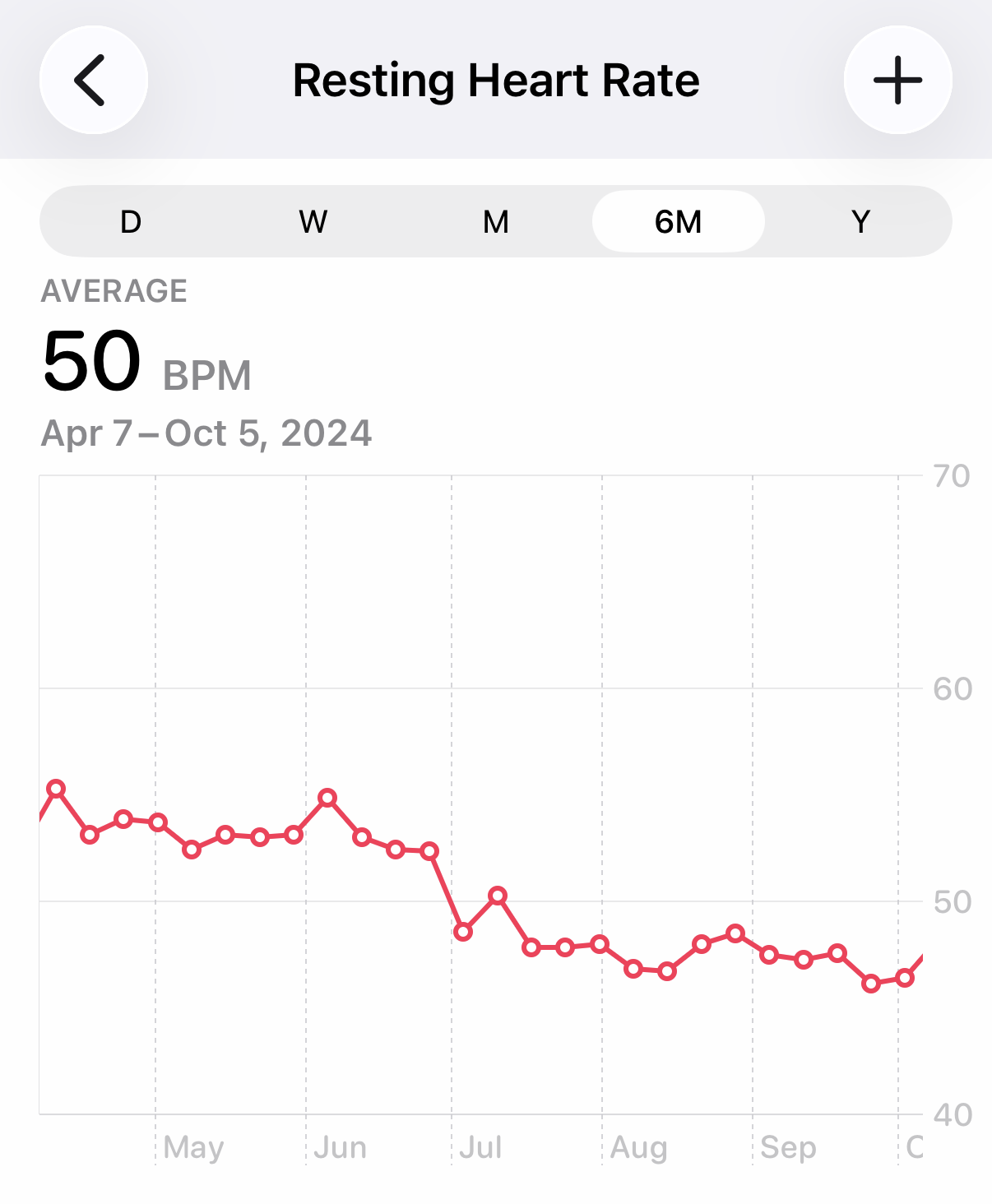

Oh, look! My heart rate went from the mid-50s down to the high-40s in July 2024 and from the high-40s to the low-50s in November 2025. What a coincidence!
What really happened, of course, was that the watch was treating some of my sleep time as awake-but-relaxed time and was counting my heart rate during those periods as resting. The Apple Watch is not as perceptive as Santa Claus.
So if you’ve always worn your watch overnight because you like getting sleep statistics from it, recognize that it may be giving you lower readings for your resting heart rate. If that matters to you, you may want to sleep without your watch for a while to see if you get a different resting heart rate.