
Pulling values from a graph without an LLM
February 4, 2026 at 9:48 AM by Dr. Drang
The inability of Claude and (especially) ChatGPT to extract data accurately from the chart discussed in the last post gnawed at me. It seemed like the sort of thing an LLM should be able to do pretty well, but Claude’s table of values needed some careful editing before I could use it. And ChatGPT just completely botched the job, even after several attempts to steer it right. I knew I could do a much better job in not much more time than I spent trying to get the LLMs to do it.
As a reminder, here’s the graph:
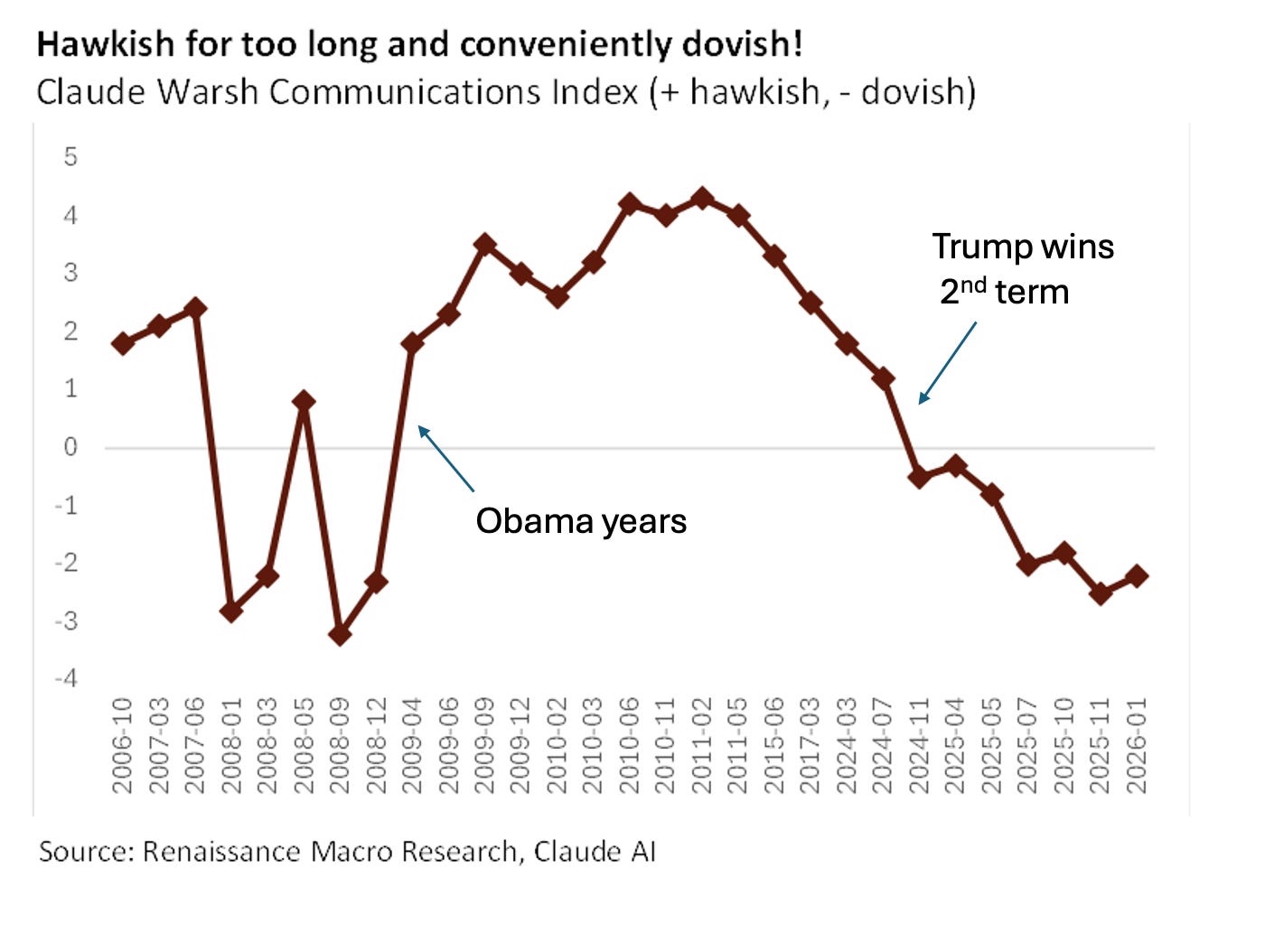
What I wanted was a CSV file with a column of dates (the x-values) and a column of floating point numbers (the y-values). One row for each of the 29 points.
I’ve done things like this in the past with OmniGraffle and AppleScript, so that’s how I approached the problem.
The first step was to get the x-values, which didn’t involve OmniGraffle or AppleScript. I opened the image in Preview, selected the text labels along the x-axis with TextSniper, and pasted the result into a new BBEdit window. Text Sniper had no trouble reading the rotated text, but it did have the values separated by space characters instead of line feeds. No problem; I just did a find/replace in BBEdit to get this:
2006-10
2007-03
2007-06
2008-01
2008-03
2008-05
2008-09
2008-12
2009-04
2009-06
2009-09
2009-12
2010-02
2010-03
2010-06
2010-11
2011-02
2011-05
2015-06
2017-03
2024-03
2024-07
2024-11
2025-04
2025-05
2025-07
2025-10
2025-11
2026-01
Update 5 Feb 2026 12:11 AM
Joe Rosensteel pointed out on Mastodon that I could have copied the text in Preview instead of TextSniper. While I knew that Preview could select text in an image, I didn’t know it could do it when the text was rotated. As long as the selection setting in the Tools menu is not Rectangular Selection, the pointer will change to the familiar I-beam shape when you move it over text. It looks a little funny because the I-beam is oriented as if it were selecting horizontal text, but the selection works.
I still prefer TextSniper and keep it in my menu bar, ready to invoke with ⇧⌘2, because it OCRs any text—regardless of orientation—within its rectangular selection, but I bought it back before macOS had built-in OCR tools. TextSniper is better, but if I didn’t already own it, I probably wouldn’t buy it today.
These dates are just months, and I figured it would be best for the plot to assume they were near the middle of each month, so I appended “-15,” to the end of each line. That set all the dates to the 15th of the month, and the comma prepared the file for pasting in the y-values:
2006-10-15,
2007-03-15,
2007-06-15,
2008-01-15,
2008-03-15,
2008-05-15,
2008-09-15,
2008-12-15,
2009-04-15,
2009-06-15,
2009-09-15,
2009-12-15,
2010-02-15,
2010-03-15,
2010-06-15,
2010-11-15,
2011-02-15,
2011-05-15,
2015-06-15,
2017-03-15,
2024-03-15,
2024-07-15,
2024-11-15,
2025-04-15,
2025-05-15,
2025-07-15,
2025-10-15,
2025-11-15,
2026-01-15,
Then came the real work. I pasted the image into a new OmniGraffle document with the scale set to “1 pt = 1 pt.” I did this because I knew that OmniGraffle’s AppleScript dictionary returns all coordinates and lengths in points with the origin at the upper left corner of the document. I then drew some thin-lined rectangles to get the y-coordinate of the horizontal axis and calculate the y-scale of the image.
A rectangle with its top edge along the horizontal axis told me that the y-origin of the plot was 581 points down from the top of the document. To get the scale of the plot, I drew another rectangle whose bottom edge was aligned with the negative sign in the “-4” label and whose top edge was aligned with the equivalent part of the “4” label. That rectangle was 512.6 points high, so the scale of the plot is
I then made a new layer called “Markers” and drew a diamond (OmniGraffle has a built-in diamond shape) sized to match the markers in the plot. By duplication and dragging, I put a diamond shape over every marker. Here’s what it looked like with every diamond selected:
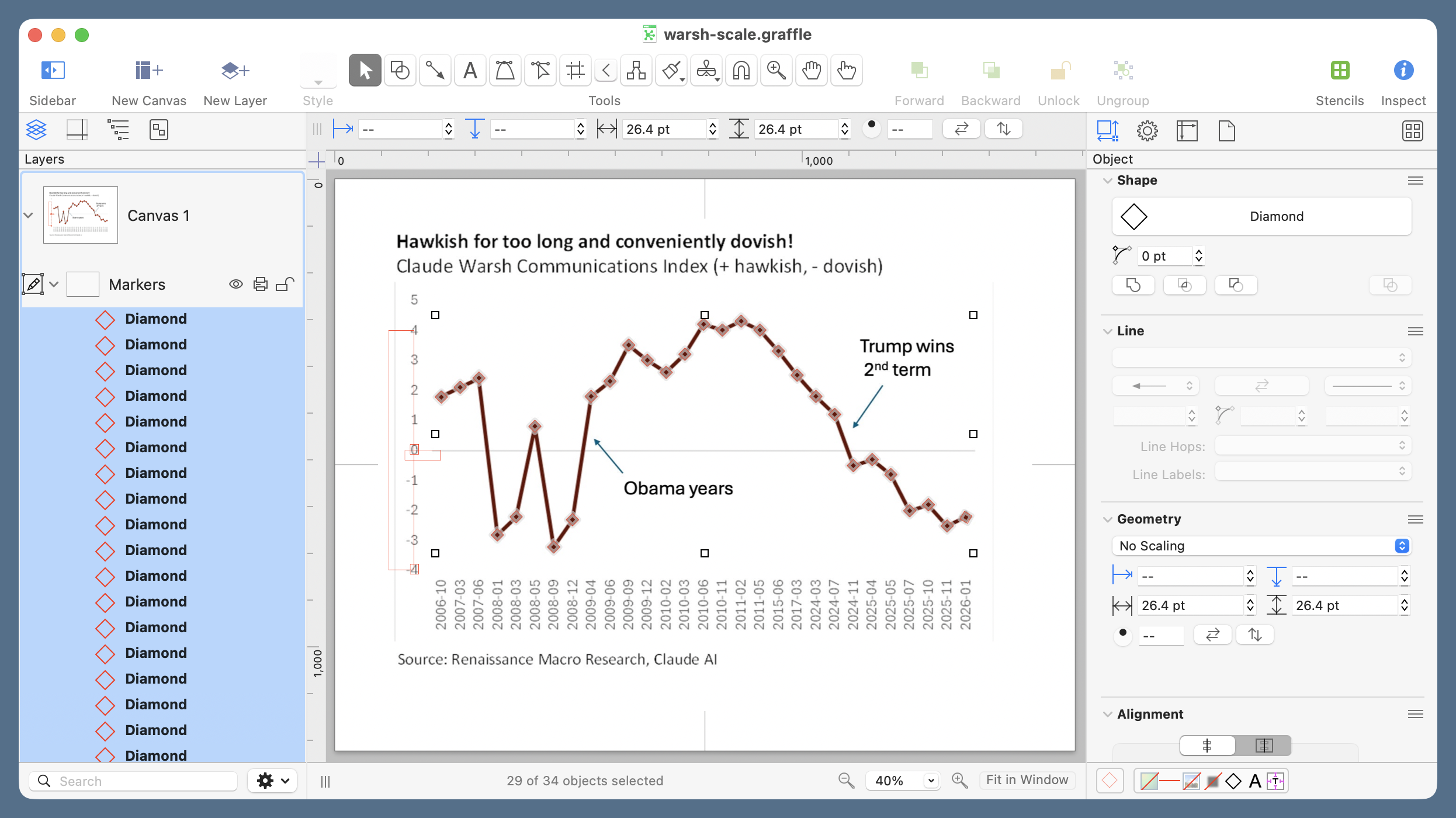
If you zoom in, you’ll see that the diamonds are 26.4 points tall, which means that the center of each diamond is 13.2 points below its top edge. We’ll need this value in the AppleScript because when OmniGraffle is asked for the location of an object, it returns the coordinates of the top left corner.
Here’s another useful tidbit I’ve learned when using OmniGraffle’s AppleScript dictionary in the past: when you ask for every shape in a layer, the list of shapes is returned in the top-to-bottom order shown in the left sidebar. You may think this is obvious, but it isn’t. As you add shapes to a layer, each new shape appears in the sidebar above its predecessor. So the order of the items in the every shape list is the opposite of the creation order. The upshot of this is that to get the y-values of the diamonds in left-to-right order (to match their date order), I created them in right-to-left order.1
Update 5 Feb 2026 12:11 PM
I forgot to mention here that the order of shapes in the sidebar is reverse chronological order only by coincidence. It’s actually the stacking order. The reason that usually corresponds to reverse chronological order is that new shapes stack above older shapes. You can, of course, take the shapes out of their original order by using the various Bring and Send commands in OmniGraffle’s Arrange menu.
Now it’s time to write and run the AppleScript that extracts the y-coordinates of the centers of the diamonds and scales them to match the plot. It’s pretty simple:
applescript:
 1:  set yValues to {}
 2:  set yOrigin to 581
 3:  set yOffset to 13.2
 4:  set yScale to 64.075
 5:
 6:  tell application "OmniGraffle"
 7:    tell layer "Markers" of canvas 1 of document 1
 8:      set diamonds to every shape
 9:      repeat with d in diamonds
10:        set pt to (origin of d)
11:        set end of yValues to (yOrigin - (item 2 of pt) - yOffset) / yScale
12:      end repeat
13:    end tell
14:  end tell
15:
16:  yValues
Line 1 initializes the list of y-values we’ll be building. Lines 2–4 set the values we established above. After the tell commands to establish that we’re focusing on the “Markers” layer, Line 8 creates the list of diamonds. Lines 9–12 loop through that list to get the location (origin) of each diamond and convert it to the value being plotted. The order in which the subtraction is done in Line 11 accounts for the fact that OmniGraffle’s coordinates increase as you go down but the plot’s coordinates increase as you go up.
Line 16 spits out the list of y-values in the Result section of Script Editor:
{1.777610453442, 2.105119526221, 2.417138303752,
-2.823376834196, -2.217843888773, 0.804769157205,
-3.225882114947, -2.315093559097, 1.802782567774,
2.308216918434, 3.517346715278, 3.011460781549,
2.606423024043, 3.211060498316, 4.212510467041,
4.018455838485, 4.315198697655, 4.018455838485,
3.316423039057, 2.512942396277, 1.803414490836,
1.203973154221, -0.507963600878, -0.304047453731,
-0.80360682595, -2.016491975871, -1.812215148741,
-2.521036825178, -2.2390063608}
That’s way more digits than is justified, but the extra digits don’t hurt anything. After turning each comma-space combination into a linefeed, I did a column paste to put the y-values after the dates. Adding a header line turned it into the CSV file I wanted for plotting:
Date,Hawk
2006-10-15,1.777610453442
2007-03-15,2.105119526221
2007-06-15,2.417138303752
2008-01-15,-2.823376834196
2008-03-15,-2.217843888773
2008-05-15,0.804769157205
2008-09-15,-3.225882114947
2008-12-15,-2.315093559097
2009-04-15,1.802782567774
2009-06-15,2.308216918434
2009-09-15,3.517346715278
2009-12-15,3.011460781549
2010-02-15,2.606423024043
2010-03-15,3.211060498316
2010-06-15,4.212510467041
2010-11-15,4.018455838485
2011-02-15,4.315198697655
2011-05-15,4.018455838485
2015-06-15,3.316423039057
2017-03-15,2.512942396277
2024-03-15,1.803414490836
2024-07-15,1.203973154221
2024-11-15,-0.507963600878
2025-04-15,-0.304047453731
2025-05-15,-0.80360682595
2025-07-15,-2.016491975871
2025-10-15,-1.812215148741
2025-11-15,-2.521036825178
2026-01-15,-2.2390063608
I still have the CSV file made by Claude. Let’s compare:
| Date | Claude | AppleScript | Difference |
|---|---|---|---|
| 2006-10-15 | 1.7 | 1.78 | -0.08 |
| 2007-03-15 | 2.0 | 2.11 | -0.11 |
| 2007-06-15 | 2.4 | 2.42 | -0.02 |
| 2008-01-15 | -2.9 | -2.82 | -0.08 |
| 2008-03-15 | -2.2 | -2.22 | 0.02 |
| 2008-05-15 | 0.8 | 0.80 | -0.00 |
| 2008-09-15 | -3.2 | -3.23 | 0.03 |
| 2008-12-15 | -2.5 | -2.32 | -0.18 |
| 2009-04-15 | 1.7 | 1.80 | -0.10 |
| 2009-06-15 | 2.2 | 2.31 | -0.11 |
| 2009-09-15 | 3.5 | 3.52 | -0.02 |
| 2009-12-15 | 3.0 | 3.01 | -0.01 |
| 2010-02-15 | 2.6 | 2.61 | -0.01 |
| 2010-03-15 | 3.1 | 3.21 | -0.11 |
| 2010-06-15 | 4.2 | 4.21 | -0.01 |
| 2010-11-15 | 4.0 | 4.02 | -0.02 |
| 2011-02-15 | 4.4 | 4.32 | 0.08 |
| 2011-05-15 | 4.1 | 4.02 | 0.08 |
| 2015-06-15 | 3.3 | 3.32 | -0.02 |
| 2017-03-15 | 2.5 | 2.51 | -0.01 |
| 2024-03-15 | 1.7 | 1.80 | -0.10 |
| 2024-07-15 | 1.2 | 1.20 | -0.00 |
| 2024-11-15 | -0.5 | -0.51 | 0.01 |
| 2025-04-15 | -0.3 | -0.30 | 0.00 |
| 2025-05-15 | -0.6 | -0.80 | 0.20 |
| 2025-07-15 | -2.1 | -2.02 | -0.08 |
| 2025-10-15 | -2.0 | -1.81 | -0.19 |
| 2025-11-15 | -2.5 | -2.52 | 0.02 |
| 2026-01-15 | -2.3 | -2.24 | -0.06 |
Claude’s values were off by only about 0.2 at worst, but recall that it originally included a spurious date and had the last seven y-values assigned to the wrong date. The “Claude” values shown above are after I figured out those obvious errors and corrected them.
An odd thing about Claude’s errors: they don’t show a consistent bias in either magnitude or direction. Like everyone who programs, I’m used to seeing output with incorrect numbers. (In my first draft of the AppleScript, I multiplied by yScale instead of dividing, which gave pretty wild results.) What I’m not used to is inexplicably wrong numbers—numbers that aren’t wrong in a predictable way.
At the risk of lengthening this post even further, here’s the graph with the AppleScript-derived values:
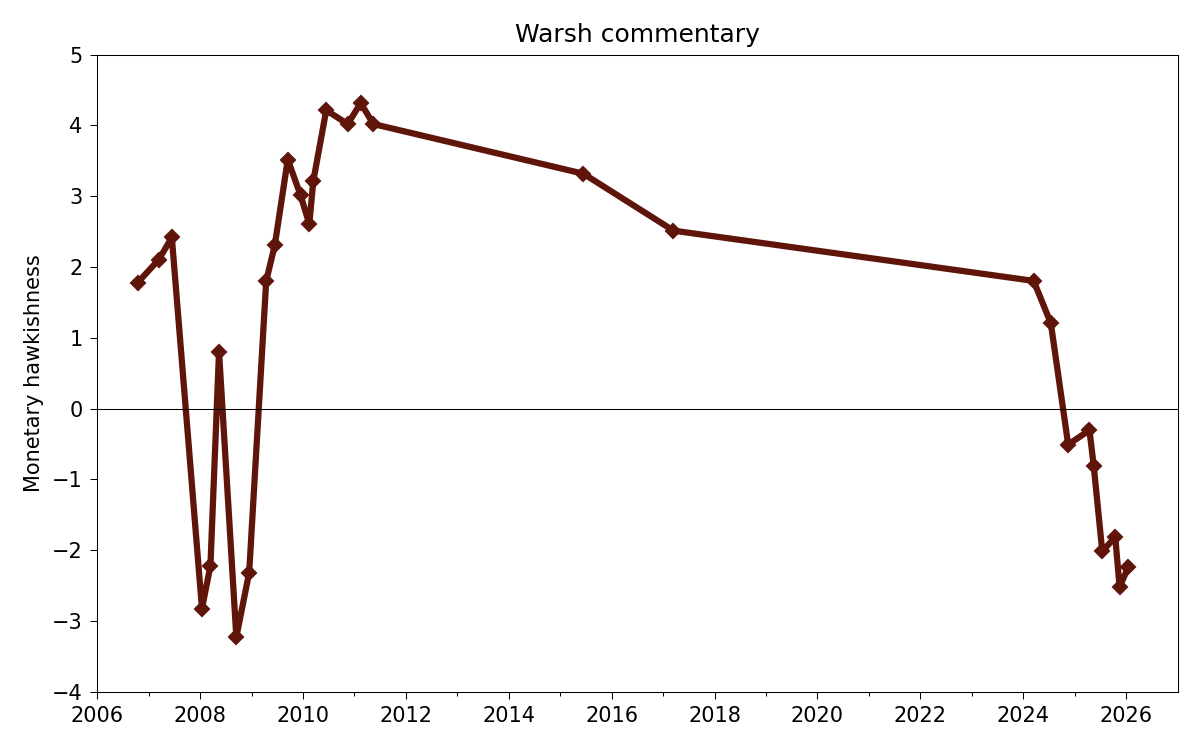
And here’s the Python code that created it:
python:
 1:  #!/usr/bin/env python3
 2:
 3:  import pandas as pd
 4:  from datetime import datetime
 5:  import matplotlib.pyplot as plt
 6:  from matplotlib.ticker import MultipleLocator, AutoMinorLocator
 7:  from matplotlib.dates import DateFormatter, YearLocator, MonthLocator
 8:
 9:  # Import the data
10:  df = pd.read_csv('warsh-applescript.csv', parse_dates=[0])
11:  x = df.Date
12:  y = df.Hawk
13:
14:  # Create the plot with a given size in inches
15:  fig, ax = plt.subplots(figsize=(8, 5))
16:
17:  # Add a line
18:  ax.plot(x, y, 'D-', color='#60150a', lw=3, ms=5)
19:
20:  # Set the limits
21:  plt.xlim(xmin=datetime(2006,1,1), xmax=datetime(2026,12,31))
22:  plt.ylim(ymin=-4, ymax=5)
23:
24:  # Set the major and minor ticks and add a grid
25:  ax.xaxis.set_major_locator(YearLocator(2))
26:  ax.xaxis.set_minor_locator(YearLocator(1))
27:  ax.xaxis.set_major_formatter(DateFormatter('%Y'))
28:  ax.yaxis.set_major_locator(MultipleLocator(1))
29:  ax.axhline(y=0, color='k', lw=.5)
30:
31:  # Title and axis labels
32:  plt.title('Warsh commentary')
33:  plt.xlabel('')
34:  plt.ylabel('Monetary hawkishness')
35:
36:  # Make the border and tick marks 0.5 points wide
37:  [ i.set_linewidth(0.5) for i in ax.spines.values() ]
38:  ax.tick_params(which='both', width=.5)
39:
40:  # Reduce the whitespace around the plot
41:  plt.tight_layout()
42:
43:  # Save as PNG
44:  plt.savefig('20260202-Warsh commentary via AppleScript.png', format='png', dpi=150)
Importing Pandas is overkill just to read a CSV file, but it’s more efficient of my time. The rest of the code is basically just my typical Matplotlib boilerplate with a few tweaks for dealing with the limits and tick spacing.
Did this take longer than having Claude return the CSV file? Of course it did, but it didn’t take much more than half an hour or so, equally divided between the OmniGraffle drawing and the AppleScript coding. And that half-hour was much more satisfying than arguing with a random number generator and then editing its work after losing the argument.
Also, because I’ve now written up the process (which took significantly longer than doing it), I have a method I can use with confidence in the future.
-
There are, of course, many ways to reverse a list, but there’s no
reversecommand in AppleScript. It’s easier to remember to create the shapes in reverse order. It takes no more time to do it that way. ↩