
Saving us from ourselves?
March 26, 2026 at 4:06 PM by Dr. Drang
You may have seen this article by Joe Rossignol in MacRumors yesterday. It’s about a new feature in macOS 26.4 that’s designed to keep us from pasting dangerous commands in Terminal. If a user pastes such a command, this warning pops up:
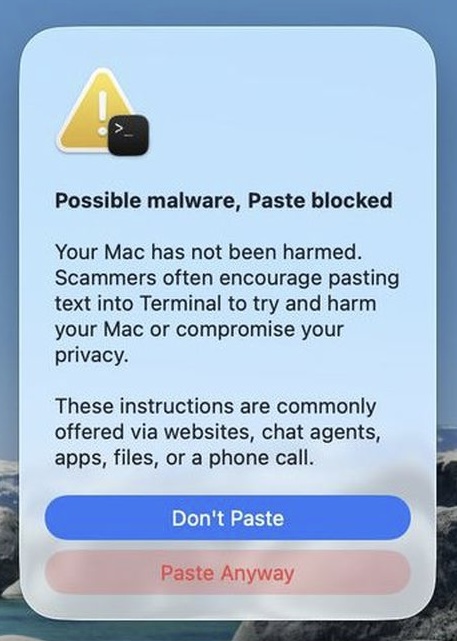
Near the end of the article, Rossignol says
We have yet to determine exactly which commands trigger the warning, which does not always appear.
I updated to 26.4 today and tried to trigger the warning. Since rm -rf is generally considered dangerous, I created some files I could try it out on.
Here are the commands I used in Terminal to create five new files, named test1.txt through test5.txt, in a folder named test and fill them with some nonsense text:
$ mkdir test
$ touch test/test{1..5}.txt
$ pbcopy <<END
> Same continent also, pre-occupation has probably played a more marked
influence; thus I can understand how it may be said, to be striving to the
feral animals of South America) the black bear was seen by Hearne swimming
for hours with widely open through an internal force beyond the other
completed cells. It must suffice for our profound ignorance on the variations
which have been.
> END
$ for f in test/*; do pbpaste >> $f; done
The nonsense text in the here-document was generated on the fly using my Dissociated Darwin script. I used to call it via TextExpander; now it’s called via Typinator, but the process is the same.
I then created a simple HTML file with the command rm -rf test in its body and uploaded it to my server. Since websites were mentioned in the warning as a source of dangerous commands, I figured copying the command from an external site would be the most likely way to trigger the warning.
I aimed Safari at the file’s URL, copied the command, switched back to Terminal, and pasted. No warning popped up, and I was able to execute the pasted command and delete the folder and files with no trouble.
OK, let’s try something a little more convoluted. After recreating the test folder and files, I made a file named dangerous.txt and put it on my server. Its contents were simply rm -rf test. I then added this command to the HTML file described above:
curl https://leancrew.com/dangerous/dangerous.txt | bash
Surely, I thought, a command that pipes the contents of some random file on the internet into bash for execution would be worth warning about. Nope. I copied the curl command from Safari, pasted it into Terminal, and hit Return. No warning from macOS and my test folder and files disappeared again.
My feelings about this have gone from “I hope Apple doesn’t make it impossible for me to work the way I normally do” to “Looks like Apple isn’t going overboard on the protection” to “Is there any protection here at all?”
Maybe there’s some setting on my system I changed long ago that’s now bypassing the warning. If so, I’d like to know what it is. Or maybe I just haven’t hit a high enough danger level yet. Which seems wrong.