
Images, the clipboard, and AppleScript
November 9, 2026 at 6:18 PM by Dr. Drang
Last week, my SnapClip macro crapped out with an error message. In the process of fixing it, I learned something about AppleScript that probably won’t ever help me in the future.
SnapClip is a Keyboard Maestro macro that puts a graphical user interface on a Python script, process-screenshot. The problem that led to the error was a particular branch of process-screenshot: the branch that puts the screenshot onto the clipboard. I’m not going to rehash the design of SnapClip or process-screenshot here—you can read the old post about them if you want the details.
The branch of process-screenshot that failed runs the impbcopy command-line utility written by Alec Jacobson over a decade ago. I’ve had impbcopy running successfully on my Macs for many years, but last week it failed with the error message
Bad CPU type in executable
I assumed the problem was that impbcopy had been compiled back when I was using an Intel Mac, and it had continued to work because of Rosetta. I thought that because I had Rosetta installed before, it would be updated along with macOS 27, but it wasn’t. Running
softwareupdate --install-rosetta
as described on the Rosetta page got SnapClip working again.
But macOS 27 is the end of the road for Rosetta, so it seemed like a change was due. I installed the Xcode Command Line Tools and tried to recompile impbcopy for Apple Silicon, but that failed with error messages that I couldn’t interpret because I’m not an Objective-C programmer. So I had four options:
- Learn enough about
gcc/Objective-C/clangto get the compilation to work. Even if I could do this, I assumed it would be a lot of work with no future value for me. - See if I could rewrite the SnapClip macro to use Keyboard Maestro features to put the image on the clipboard. This was more appealing, but I really liked the way the macro was structured and preferred to leave it as a GUI wrapper.
- Look into using Shortcuts to put the image on the clipboard and—if it can—replace the call to
impbcopywith an equivalent call to theshortcutsutility. But I hate Shortcuts and would rather avoid it if possible. - Work out an AppleScript solution and put a call to
osascriptintoprocess-screenshot. I knew that AppleScript has commands for reading files and putting things on the clipboard, so I went with this, even though AppleScript may be more of a dead end than Objective-C.
Apple’s online documentation for AppleScript sucks, but I have three old AppleScript books that collectively weigh over nine pounds:
- AppleScript: The Definitive Guide by Matt Neuburg.
- AppleScript 1-2-3 by Sal Soghoian and Bill Cheeseman.
- Learn AppleScript by Hamish Sanderson and Hanaan Rosenthal.
The answer (more or less) was in Learn AppleScript and led to just a couple of changes to process-screenshot. Here’s the new version:
python:
 1:  #!/usr/bin/env python3
 2:
 3:  import tempfile
 4:  from PIL import Image
 5:  import os
 6:  import subprocess
 7:  import shutil
 8:  from datetime import datetime
 9:  import urllib.parse
10:  import argparse
11:
12:  # Handle the arguments
13:  desc = 'Process a screenshot saved to a file.'
14:  ep = '''If a title is given, it saves the image to a file on the
15:  Desktop with a filename of the form yyyymmdd-title.png.
16:  If no title is given, the image is put on the clipboard and the
17:  upload option is ignored.'''
18:  parser = argparse.ArgumentParser(description=desc, epilog=ep,
19:            formatter_class=argparse.RawDescriptionHelpFormatter)
20:  parser.add_argument('-b', '--background', help='add desktop background border', action='store_true')
21:  parser.add_argument('-u', '--upload', help='upload to images directory and print URL', action='store_true')
22:  parser.add_argument('-t', '--title', help='image title', type=str)
23:  parser.add_argument('ssfile', help='path to screenshot file')
24:  args = parser.parse_args()
25:
26:  # Parameters
27:  type = "png"
28:  bgcolor = (85, 111, 137)
29:  border = 32
30:  optimizer = '/Applications/ImageOptim.app/Contents/MacOS/ImageOptim'
31:  ascript = f'set the clipboard to (read POSIX file "{args.ssfile}" as picture)'
32:
33:  # Add a desktop background border if asked for
34:  if args.background:
35:    snap = Image.open(args.ssfile)
36:    # Make a solid-colored background bigger than the screenshot.
37:    snapsize = tuple([ x + 2*border for x in snap.size ])
38:    bg = Image.new('RGBA', snapsize, bgcolor)
39:    bg.alpha_composite(snap, dest=(border, border))
40:    bg.save(args.ssfile)
41:
42:  # Optimize the file
43:  subprocess.run([optimizer, args.ssfile], stderr=subprocess.DEVNULL)
44:
45:  # Save it to a Desktop file if a title was given; otherwise,
46:  # save it to the clipboard
47:  if args.title:
48:    sdate = datetime.now().strftime("%Y%m%d")
49:    desktop = os.environ['HOME'] + "/Desktop/"
50:    fname = f'{desktop}{sdate}-{args.title}.{type}'
51:    shutil.copyfile(args.ssfile, fname)
52:    bname = os.path.basename(fname)
53:
54:    # Upload the file and print the URL if asked
55:    if args.upload:
56:      year = datetime.now().strftime("%Y")
57:      server = f'user@server.com:path/to/images{year}/'
58:      port = '123456789'
59:      subprocess.run(['scp', '-P', port, fname, server])
60:      bname = urllib.parse.quote(bname)
61:      print(f'https://leancrew.com/all-this/images{year}/{bname}')
62:  else:
63:    subprocess.run(['osascript', '-e', ascript])
64:
65:  # Delete the temporary file
66:  os.remove(args.ssfile)
The changes are:
- Line 31, which is an added line that defines the AppleScript command that does what
impbcopyused to do; and - Line 63, which runs the
ascriptcommand viaosascript.
The AppleScript that does the work is just one line:
set the clipboard to (read POSIX file "<name of file>" as picture)
Very simple, and I suspect it will work for quite a while. I feel certain that Apple would like to kill AppleScript, but I don’t think it can—too many valuable customers (a group that doesn’t include me) would get very angry at having their longstanding automations die.
One thing that kind of surprised me was the as picture part of the command. Learn AppleScript says that you typically have to include an image type in the command: as GIF picture or as JPEG picture or as TIFF picture. The book suggests that a bare as picture is supposed to work only on PICT images. Never heard of a PICT image? That’s probably because it was the native Mac image format back in the classic days. It was one of Bill Atkinson’s contributions to the Macintosh Toolbox. Nobody saves image files as PICTs anymore.
And yet the unadorned as picture works. I created this test image in Acorn,

and saved it in several formats: BMP, GIF, HEIC, JPEG, JPEG 2000, PNG, and TIFF. I put the files in a folder named clipboard-test on my Desktop,
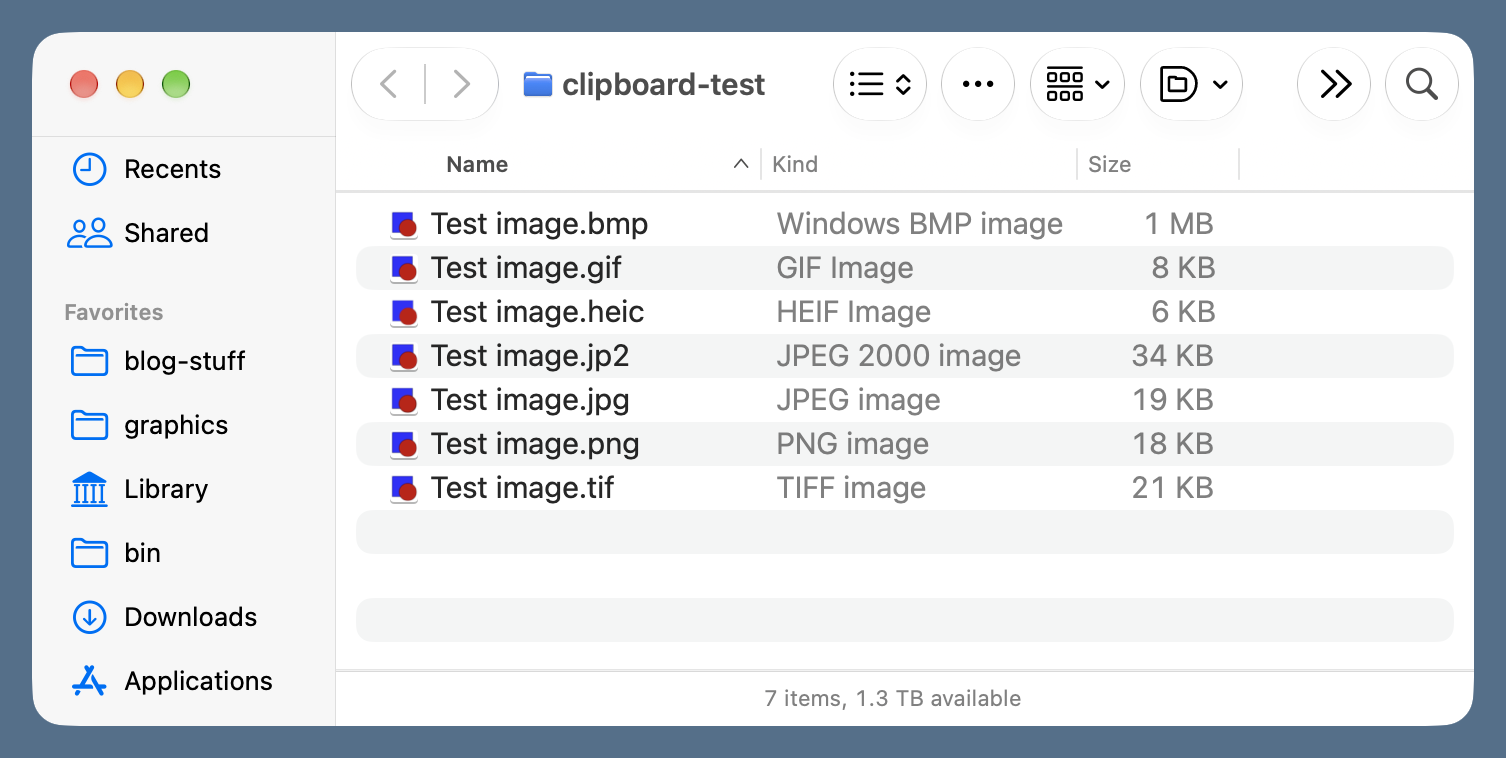
and ran this AppleScript for each of the different file extensions:
applescript:
set filePath to path to desktop folder as text
set imageFile to (filePath & "clipboard-test:Test image.bmp") as alias
set the clipboard to (read file imageFile as picture)
Each time I ran the script, the clipboard was loaded with the image, no matter which file was being read. I didn’t have to specify the format.
I suspect that if I were using AppleScript to write image data to a file, it wouldn’t be as forgiving. But process-screenshot uses Python and Pillow to save image files, so I don’t need to worry about AppleScript’s idiosyncrasies for that aspect of the script.