Making a tall, skinny plot in Mathematica
October 7, 2026 at 12:12 PM by Dr. Drang
Yesterday’s post included this plot:
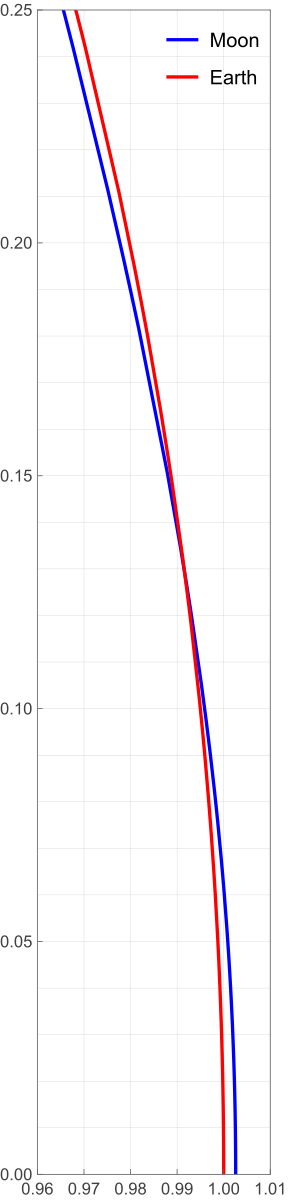
I figured it was worth a quick post to show how I made it.
I had already done most of the work back in 2022 in a Mathematica notebook I made to support my original orbital curvature post. So I copied the pertinent calculations from that notebook, pasted them into a new one, and made the adjustments necessary to produce the plot. Here’s the new notebook:
The bottom half of the notebook is where the plotting commands are. The key items are:
- The definitions of
xGrid,xTicks,yGrid, andyTicks. These produce lists of values used to lay out the grid spacing and tick mark labels. Most of this is self-explanatory, but I do want to call out the use ofNumberFormto format the tick labels with two decimal places.NumberForm[x, {3, 2}]is very much like Python’s{x:3.2f}in an f-string. Like most things in Mathematica, it’s kind of verbose, but it is readable. The call to
ParametricPlotincludes the optionAspectRatio -> .25/.05AspectRatiosets the ratio of height to width for the plot as a whole, so the value I set it to was based on the ratio of the values given in thePlotRangeoption. The overall plot is 0.25 units high and 0.05 units wide, so to make the x and y units the same size,AspectRatiois set to that ratio. I entered it as a division instead of as the number 5 because I wanted the reasoning behind it to be clear. I suppose I could have been even more explicit by sayingAspectRatio -> (.25 - 0)/(1.01 - .96)but there are limits to my verbosity, even when using Mathematica.
To get the image out of the notebook, I right-clicked on it, selected from the popup menu, and chose SVG as the format. That’s why the plot stays smooth if you zoom in on it.
Distorted plots
October 6, 2026 at 9:08 PM by Dr. Drang
Rhett Allain, physics professor and blogger, published a nice article today about the Moon’s orbit. It follows largely the same line of reasoning as my post on the same topic (and the various write-ups I linked to in that post) from a few years ago. I nodded my head as I read through it, until I got to a plot at the end of the article.
For much of the article, Allain complains about how the orbit of the Moon as it and the Earth make their way around the Sun is often distorted in textbooks. Like this, which is a frame from an animated GIF in the article.
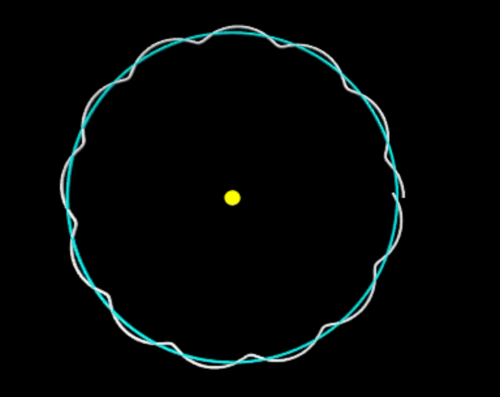
In this image, the Earth-Moon distance is exaggerated, and it looks like the Moon curves away from the Sun when it’s between the Earth and the Sun. To show that this is wrong, he plots portions of the Moon and Earth orbits without exaggerating the Moon-Earth distance:
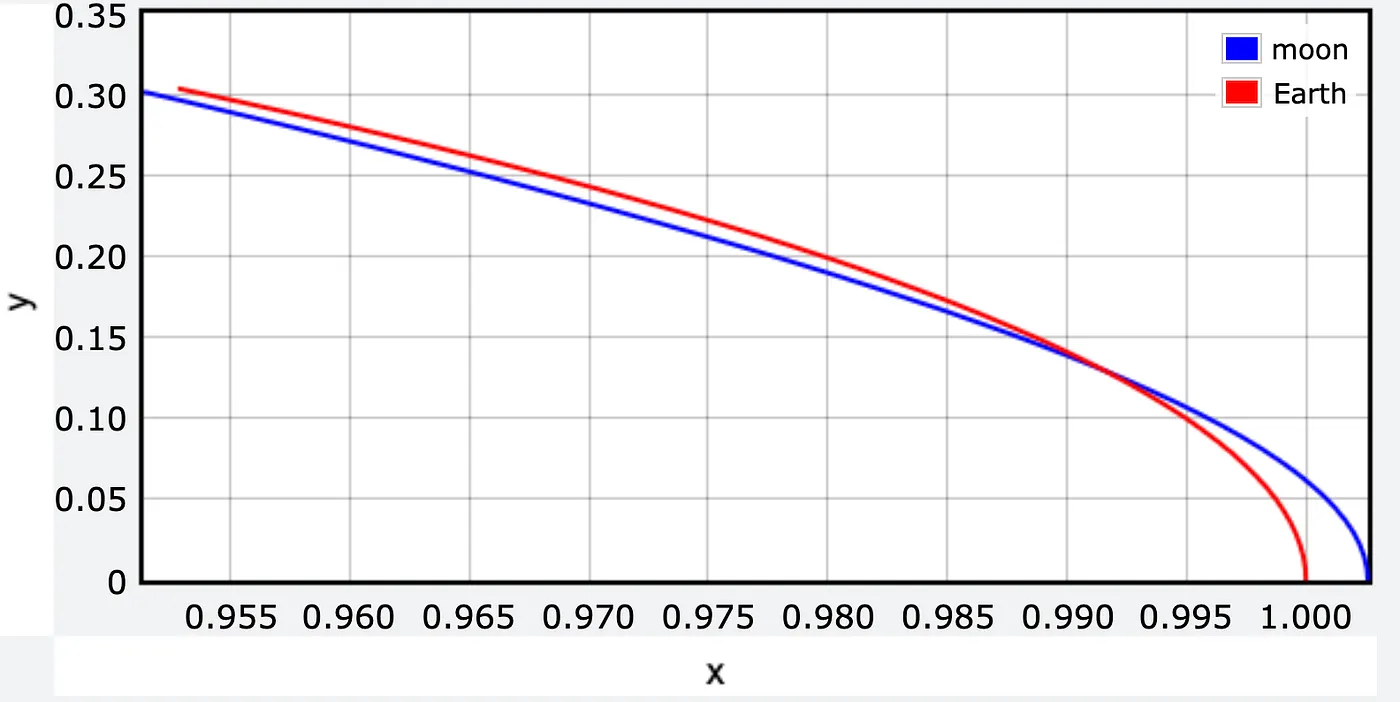
Forgive me, but what the actual fuck? How can you spend over 1000 words complaining about graphical distortions and then produce this? Sure, it’s not the same distortion he was complaining about, but still. The whole point of the article was to show that the Moon’s path over the course of an Earth year is a sort of wobbly circle around the Sun. The arcs in this plot are nowhere near circular.
Here’s a properly scaled version of Allain’s plot:
Yes, the plot is really tall and skinny. It has to be to avoid distorting the paths. Note that the grids are square and represent the same distance in each direction.
We all know how this happened. The range of the x data is very small compared to the range of the y data, but because the plotting software defaults to a landscape-style graph, the paths come out looking like arcs of very wide ellipses. Unless the person running the software steps in to make sure x and y distances are drawn to the same scale.
I could write a post like this almost every day. So many people accept the defaults of their graphing software without thinking about how one or two small tweaks could make their plots so much better.
Too dumb for AI
September 30, 2026 at 4:13 PM by Dr. Drang
I’ll admit that the first thing I looked into regarding yesterday’s “Super Intelligence” meeting at the White House was whether Tim Cook was there. He wasn’t, which was probably a relief to Tim, even though it’s also an admission that Apple isn’t considered a player in AI. By anyone, not even the idiots in the Trump administration.
You’ve probably seen the stupid misspelling above Trump’s signature on the “morally binding” agreement that came out of the meeting.
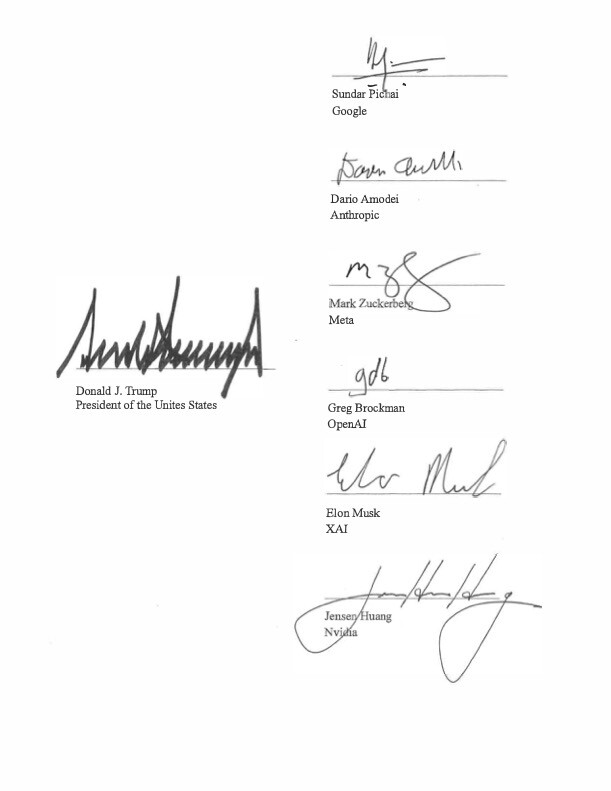
Yes, he signed it as the “President of the Unites States” and then proudly posted it to Truth Social. I can’t imagine the agreement means anything, as you’d be hard-pressed to find a single moral shared among the people in the meeting. I will say, though, that Jensen Huang’s signature is pretty spiffy.
As for who was at the meeting, Trump also posted this seating chart, which hurts to look at:
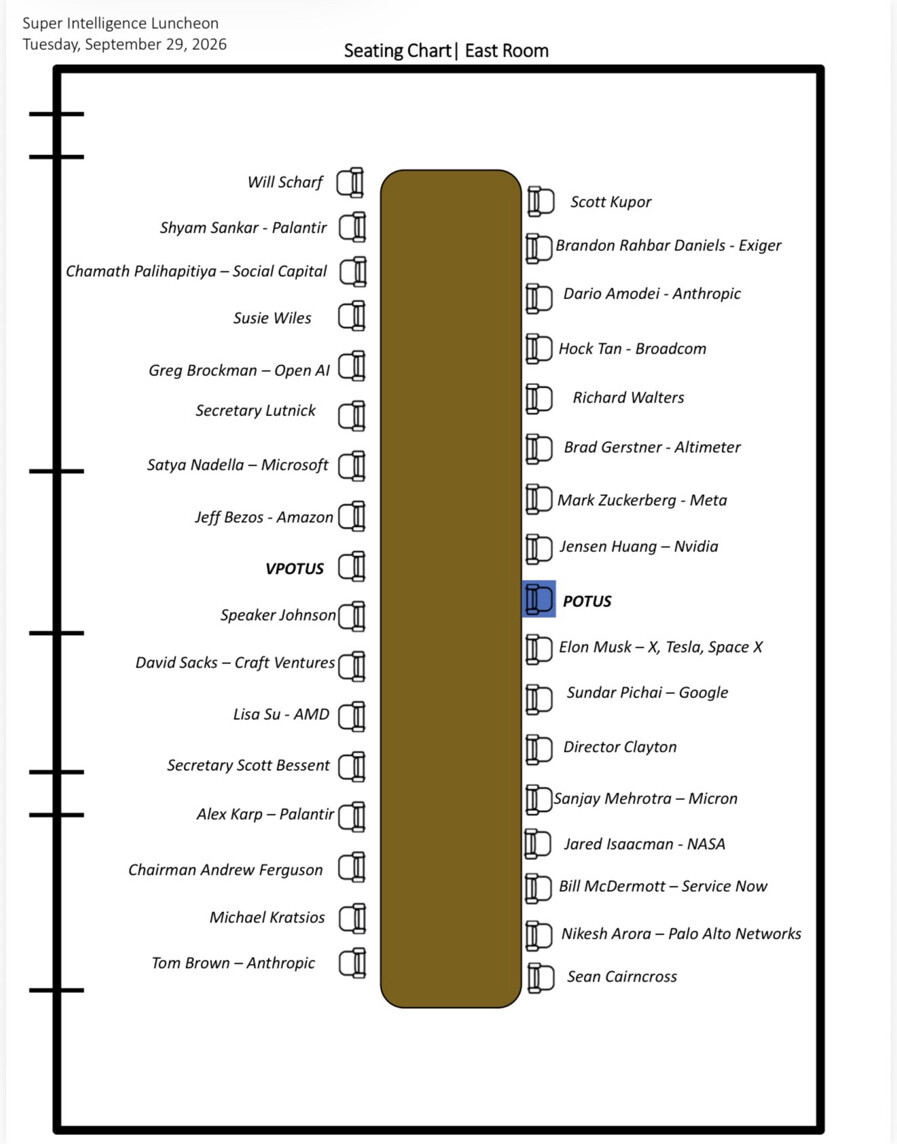
Click the image to see it at full size, if you dare. Also, don’t feel obligated to follow either of the Truth Social links; I’m including them only because I feel an obligation to give credit—or in this case blame.
Lots of the images Trump posts are AI-generated, but I find it hard to believe that any AI system would produce something with this many graphical errors:
- The chairs on the left side of the table are vertically offset from those on the right side, even though there are the same number on each side. Poor Will Scharf is nearly off the end.
- The chairs on the left are distinctly farther from the table than the chairs on the right.
- The vertical spaces between chairs on a given side aren’t equal. The seats near the ends are closer to one another than the seats near the center.
- The two lines of chairs aren’t horizontally aligned. This was perhaps the smallest mistake, and you probably can’t see it unless you zoom in, but what drawing app wouldn’t automatically align the items?
- The names and chairs aren’t aligned vertically. You’d expect the names to be centered vertically with the chairs, and many of them are at least close to that, but once you see Alex Karp and Andrew Ferguson you’ll notice several similar misalignments.
- The names on the left side should be right-aligned but aren’t. Susie Wiles is way out of her chair, while David Sacks has nearly crashed into his.
- Similarly, the names on the right side should be left-aligned but aren’t. See Richard Walters and Sanjay Mehrotra for the most extreme misalignments.
And then there’s the best one:
- The chairs are facing away from the table.
The meeting probably would have been better for all of us if this had been so.
A small probability correction
September 29, 2026 at 10:35 AM by Dr. Drang
This short video appeared in my YouTube feed last week. It’s from Hannah Fry, whom you probably know from her appearances on Numberphile and other STEM-oriented stuff. If you’re in the UK, you’ve may have seen her on the BBC, too.
The short presents a classic problem in conditional probability, but the answer she comes up with is wrong. It’s a good estimate, and it’s the same answer I got when I stopped the video and tried to work it out in my head, but it’s still wrong. By just a little bit.
Here’s the problem: There’s a disease that affects 1 in 1,000 people. A test for the disease is perfect in one sense but imperfect in another. If you have the disease, the test will return a positive result 100% of the time. If you don’t have the disease, the test will return a negative result 95% of the time but a positive result 5% of the time. If you have the test and the result is positive, what is the probability you have the disease?
What makes this a classic problem is that it presents you with conditional probability in one sense (the probability of a positive test given that you have the disease) and asks for a conditional probability in the opposite sense (the probability that you have the disease given that your test was positive). The solution combines the definition of conditional probability, the commutative property of intersections, and the law of total probability.
Let’s define some events. is you having the disease, and is you getting a positive test result. Putting a horizontal bar over these indicates not having the disease and not testing positive (i.e., testing negative), respectively. Therefore
The vertical bars are read as “given,” meaning the event after the bar is the condition. What we’ve been asked to find is . Let’s work it out.
By the definition of conditional probability, we can say
where means the intersection of the two events. So
Because the intersection of events is commutative
Both terms on the right-hand side of this equation are known, so we can say
Since and are mutually exclusive and collectively exhaustive, the law of total probability says
So
which is, as I said, pretty close to the 2% answer in the video but not exactly.
This formal approach is how you’re taught to solve problems like this in an introductory probability class, but Dr. Fry and I used a more concrete method to get our nearly correct answers. Here’s what we did:
Imagine 1,000 typical people. Of these, 1 should have the disease (correct) and 50 should test positive (incorrect). That tells us that 1 in 50, or 2%, of the people who test positive will have the disease. Here’s a screenshot from the video that matches this calculation:
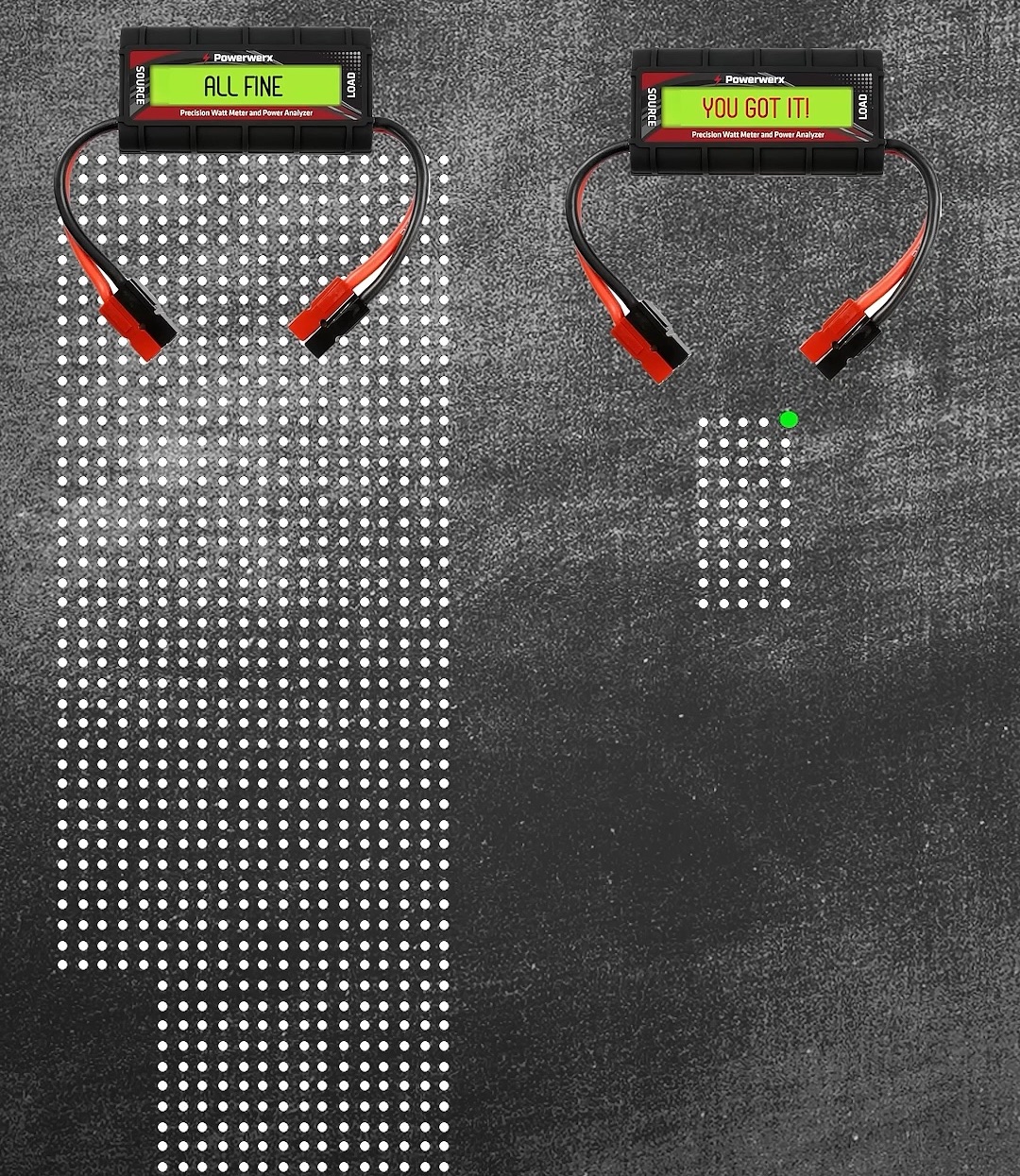
What makes this calculation wrong is that it implicitly assumes that 5% of everyone will test positive, not 5% of only those who don’t have the disease. The number who will test positive should be 5% of 999, which is 49.95, plus the 1 who does have the disease. So 1 in 50.95, or 1.9627%, of those who test positive will have the disease. This answer matches that of the formal approach.
This is somewhat unsatisfying, though, as the purpose of this “imagine a bunch of typical people” method is to have all the people counts be integers. Although the numbers work out when you get to the end, it’s distracting to litter the discussion with fractional people. You can get around this by imagining more people—a million, say—but then all the numbers get bigger: 1,000 people with the disease and 49,950 false positives. This isn’t a problem for the kind of people who read this blog but isn’t so great for the more general audience Dr. Fry is addressing.
Personally, I would have been OK with her saying that 5% of 999 is almost 50, so the number who test positive is nearly 51. And 1 out of 51 is just under 2%—call it 2% in round figures. You still make the point that it’s way less than 95% and that problems like this require some care.